Solitaire Setup Diagram
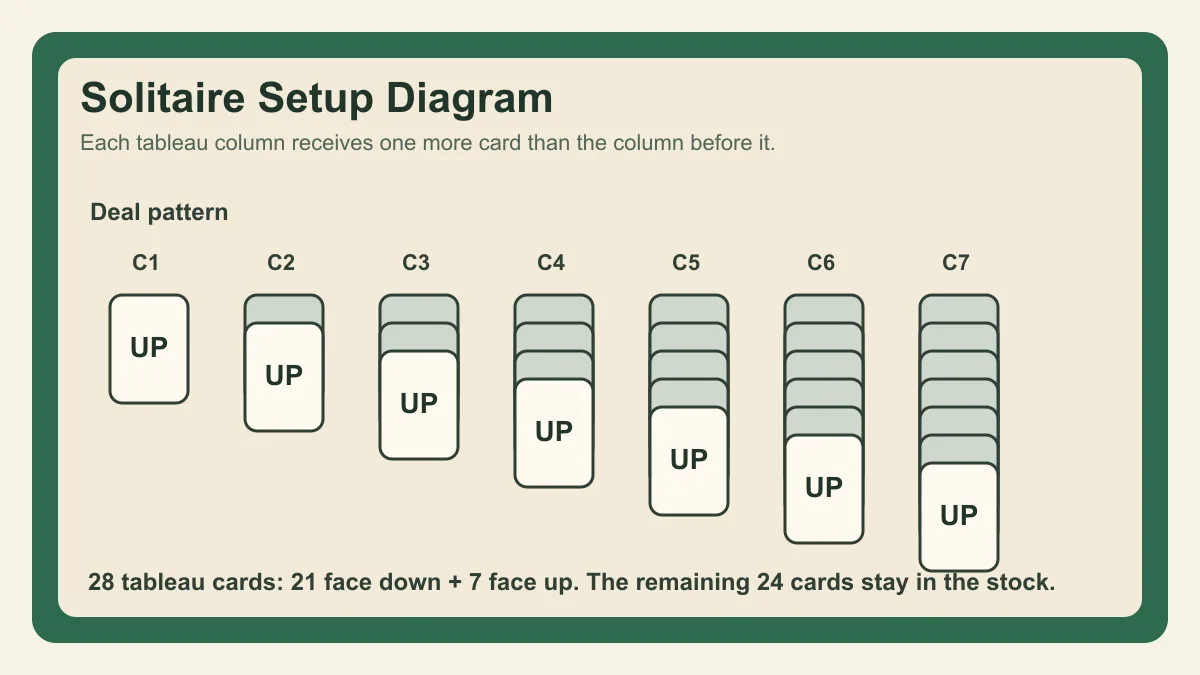
The classic setup uses a simple pattern: seven tableau columns grow from left to right. Column one has one card, column two has two cards, and column seven has seven cards. The top card of each column is face up. Everything below it is face down.
| Area | Starting cards | Purpose |
|---|---|---|
| Tableau | 28 | Main play area with seven columns |
| Stock | 24 | Cards drawn into the waste |
| Waste | 0 | Holds drawn stock cards |
| Foundations | 0 | Build each suit from Ace to King |
You can picture the layout like this:
Stock  Waste        Foundation  Foundation  Foundation  Foundation

  1      2      3      4      5      6      7
 [up]  [down] [down] [down] [down] [down] [down]
       [up]   [down] [down] [down] [down] [down]
              [up]   [down] [down] [down] [down]
                     [up]   [down] [down] [down]
                            [up]   [down] [down]
                                   [up]   [down]
                                          [up]
The exact spacing is not important, but the pattern is. Each column has one more card than the column before it, and only the top card is face up. The remaining twenty-four cards become the stock.
Goal of the Layout
The layout hides information but leaves enough visible cards for opening moves. The seven face-up cards give you options, while the face-down cards create the challenge. Revealing those hidden cards is a major part of good play.
The setup is balanced around uncertainty. If every card were face up, the game would become closer to FreeCell. If too few cards were visible, the opening would feel random. Seven visible cards give the player enough information to choose a first move while preserving the puzzle.
The deeper columns matter most. Column seven starts with six hidden cards, so opening it can change the game more than clearing a short column. That does not mean you should ignore the left side. Short columns often clear first and create empty spaces for Kings. The best opening plan uses both: reveal deep cards when possible and use short columns to create space.
Setting Up Foundations
Foundations begin empty. Each foundation accepts one suit. You move Aces first, then continue upward by rank. A completed foundation ends with a King.
The foundations are usually placed above the tableau so progress is easy to scan. In a physical layout, you can put them anywhere that leaves enough space, but keeping them grouped by suit reduces mistakes. In a browser game, the suits are labeled so the player can quickly see which foundation accepts the next card.
Do not place cards in the foundations during setup. Foundations start empty. The first foundation move happens after play begins and an Ace becomes available from the tableau or waste.
Setting Up the Stock and Waste
After the tableau is dealt, the rest of the deck becomes the stock. In Draw 1, one card moves from stock to waste. In Draw 3, three cards move, but only the top waste card can be played.
The stock should sit near the waste because cards move directly from one pile to the other. In Draw 1, the waste shows one newly available card. In Draw 3, the waste may show a small stack, but the playable card is still the top one. This difference changes difficulty without changing the tableau setup.
If you are setting up with physical cards, keep the stock face down. Draw cards cleanly so the waste order remains consistent. If you are playing online, the game handles the order and exposes the draw mode through the controls.
Common Setup Mistakes
Do not deal all tableau cards face up if you want standard Klondike. Do not put random cards into foundations before play begins. The standard setup is fixed because the hidden-card structure is what creates the puzzle.
Another mistake is dealing the same number of cards to each column. The seven-column pattern must increase from one card to seven cards. If every column has the same height, the game will not match classic rules and the balance will be wrong.
Players also sometimes turn the wrong card face up. Only the top card of each tableau column starts face up. Every card beneath it remains face down until uncovered through play. Turning extra cards face up makes the game easier but changes the standard layout.
Step-by-Step Setup
Shuffle one standard deck. Deal one face-up card to the first column. Deal one face-down card to columns two through seven. Then deal a face-up card to the second column and face-down cards to columns three through seven. Continue this pattern until the seventh column receives its final face-up card.
At the end, the tableau contains twenty-eight cards. Seven are face up, one on each column. Twenty-one are face down. The remaining twenty-four cards form the stock. The waste starts empty, and the four foundations start empty.
This dealing method sounds slower than simply placing piles, but it helps avoid setup errors. Each pass across the table adds one layer. The final face-up diagonal should run from the first column down to the seventh.
Setup and Strategy
The setup explains many strategy principles. Deep columns hide more cards, so reveals there are valuable. Short columns are easier to clear, so they often create the first empty column. The stock contains almost half the deck, so draw mode affects how quickly those cards become useful.
When you understand the layout, the first moves become easier to evaluate. A move from a deep column may reveal information. A move from a short column may create space. A move from the stock may provide a missing rank. Strong play comes from matching the move to the part of the setup that currently limits access.
Digital Setup Notes
The browser version deals instantly from a seed, which means the same seed can recreate the same layout. Restart keeps the seed and repeats the setup. New Game creates a fresh shuffle. This is useful for testing decisions because you can replay one layout and compare different opening lines.
Large-card and high-contrast settings do not change the setup. They only change readability. The card order, hidden cards, stock, waste, and foundations remain the same.
Setup Verification Checklist
Before play starts, check the count. The tableau should contain twenty-eight cards. The stock should contain twenty-four cards. The waste should be empty. The foundations should be empty. Exactly seven tableau cards should be face up.
If the first column has more than one card, the layout is wrong. If the seventh column does not have seven cards, the layout is wrong. If any foundation already contains a card, play has started too early or the setup was changed.
Physical Table Tips
Leave enough space between columns so sequences can be moved without covering the next pile. Keep the stock and waste separate, especially in Draw 3, because the order of waste cards matters. Put the foundations above the tableau where they are easy to see.
If you are teaching someone, deal the columns slowly and name each area: tableau, stock, waste, foundations. The vocabulary helps the rules make sense later. A player who understands the layout will understand why revealing hidden cards and saving empty columns matters.
Why the Standard Layout Matters
Small setup changes create a different game. Turning every tableau card face up removes the hidden-information challenge. Allowing any card into an empty column removes the King-space puzzle. Starting foundations with random cards changes the win path. The standard layout has lasted because it balances luck, memory, and planning in a compact table.
The setup also explains why the game works well online. A seed can store the shuffle, the browser can reproduce the same tableau instantly, and settings can change the presentation without changing the deal. That makes practice cleaner than a physical redeal because the same position can be tested again.
For accessibility, the layout should keep every pile distinct. The player needs to tell the stock from the waste, the foundations from the tableau, and face-up cards from face-down cards at a glance. Clear spacing is not decoration; it protects the rules from being misread.
The same principle applies on mobile. Columns may shrink, but the setup still needs stable pile positions, readable cards, and enough spacing to prevent accidental moves.
Good setup protects play.